
PLM/Forma Integrations & Digital Thread
An engineering change has been approved in Autodesk Fusion Manage, and the revised drawing is available in Autodesk Vault. Yet the production planner is looking at an open manufacturing order and asking: Do we finish the remaining units with the previous revision, or switch to the new one?
Purchasing has ordered components, quality needs the applicable specification, and the engineer is back in a conversation that seemed finished. The approval was recorded, but the next decision wasn't. A PLM implementation becomes a people project when an approval must mean something to everyone who acts on it.
The change is approved. What can production actually do?
Consider a component whose dimensions change while an earlier revision is already being manufactured. Engineering can confirm the new design is correct, but that does not determine whether existing stock remains usable, whether a purchase order needs amending, or when the updated bill of materials (BOM) should become effective in ERP.
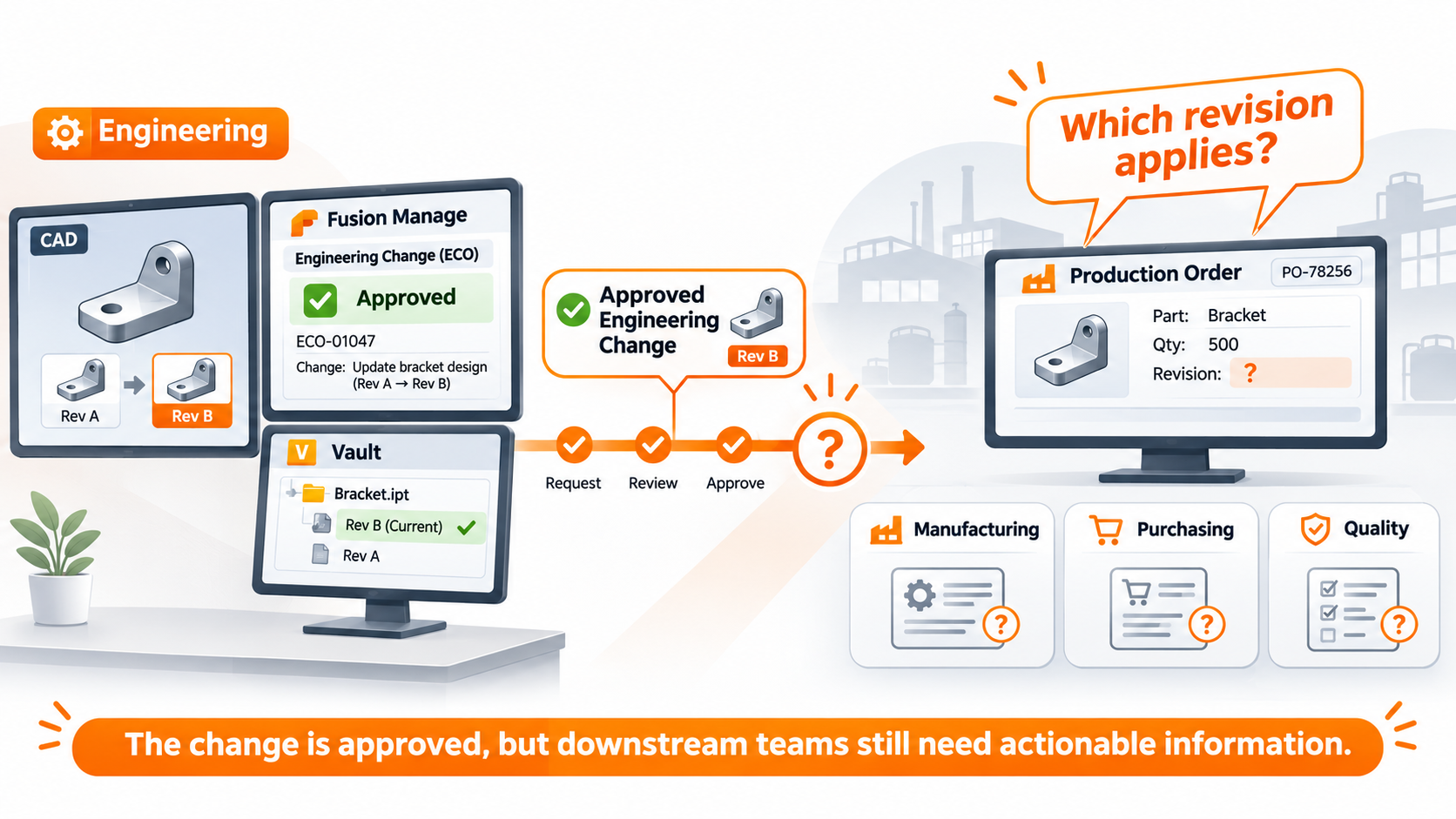
Manufacturing knows what's in progress, purchasing knows what's committed, and quality may need evidence of the specification used. If the PLM workflow captures only engineering approval, the remaining questions move into emails and calls. The company has a traceable change, but no shared understanding of what happens next.
Autodesk Fusion Manage supports change orders, workflow states, tasks and approval responsibilities. Those capabilities coordinate decisions, but do not establish manufacturing effectivity or guarantee downstream updates. The organization must define what information reaches the next person.
Why people work around a technically correct workflow
When a new approval route is introduced, an engineer may see another required field as a delay, while a production planner sees the missing information as a risk. Purchasing receives a revision notification but cannot tell whether an open order should change. The process leaves gaps between those responsibilities.
The workaround is often familiar: ask the experienced colleague who has always known which revisions matter, or send a quick email instead of relying on the record. Moving that knowledge into a transparent process changes established habits, and sometimes the influence of informal decision-makers. The experienced engineer who knows which supplier can accept the older design may now be asked to document a judgment they once made in a conversation. That knowledge is worth preserving when it helps the next person act.
PLM also arrives alongside ERP projects, CAD upgrades and delivery pressure. If users see another interruption, or fear their recorded actions will be used to monitor them, quiet resistance is understandable.
Adding more approvers does not solve that tension. Assessing production impact differs from authorizing a design. A rigid route may delay a minor correction yet fail to resolve a critical change affecting active orders. Good PLM change management makes the necessary decisions visible without adding approval steps that serve no purpose.
Design the process around work that actually happens
A recent change that caused confusion is a more useful starting point than an ideal process diagram. Where did production first discover that its order might be affected? Who knew whether the old material could still be used? Why did purchasing need to call engineering, and what information was missing from the change record?
Those conversations reveal unwritten rules. A drawing clarification may need little coordination, while a dimensional change affecting fit requires manufacturing and quality input. Treating both identically slows routine work or overlooks risk.
Engineering, manufacturing, purchasing and quality must agree what released means and who decides when a revision applies to existing work. Otherwise an engineer can complete every field while a planner still has to determine which drawing to use. Approving a design and authorizing its use are different decisions. Trusted informal problem-solvers should help test the process so their knowledge informs it instead of disappearing after go-live.
When a notification still leaves its recipient searching for context, this COOLORANGE Fusion Manage customer story shows how workflow messages can become more useful.
The implementation trade-offs people feel first
How much should the first implementation cover? Introducing change management, BOM control, supplier collaboration and every integration at once can delay visible results. A narrower scope, tested in daily work, builds trust before the project expands. For one team, that may mean reliable revision control and accessible released drawings before introducing more complex change approvals. Another may already have sound document control but need to repair the handover to ERP. The right first phase depends on where the work currently breaks down.
If an engineer finds duplicate part numbers, inconsistent properties or unclear revision status, they will check with a colleague rather than trust the system. Historical files and metadata need decisions about what to migrate, correct or leave behind. Otherwise the new workflow inherits the old uncertainty, and a record marked as released may still require someone to check whether its properties are usable downstream.
Beyond licenses and configuration, engineers and planners must agree naming conventions, approval rules and ownership after go-live. That internal time competes with daily delivery, but unresolved decisions cost more later.
Where COOLORANGE helps connect PLM decisions to downstream work
Even an agreed workflow reaches a boundary between applications. Autodesk Vault manages engineering files and, where Vault Items are used, item and BOM data. Fusion Manage coordinates broader lifecycle processes. ERP supports purchasing, inventory and manufacturing activities. Approval in one does not prove the others have received the right data.
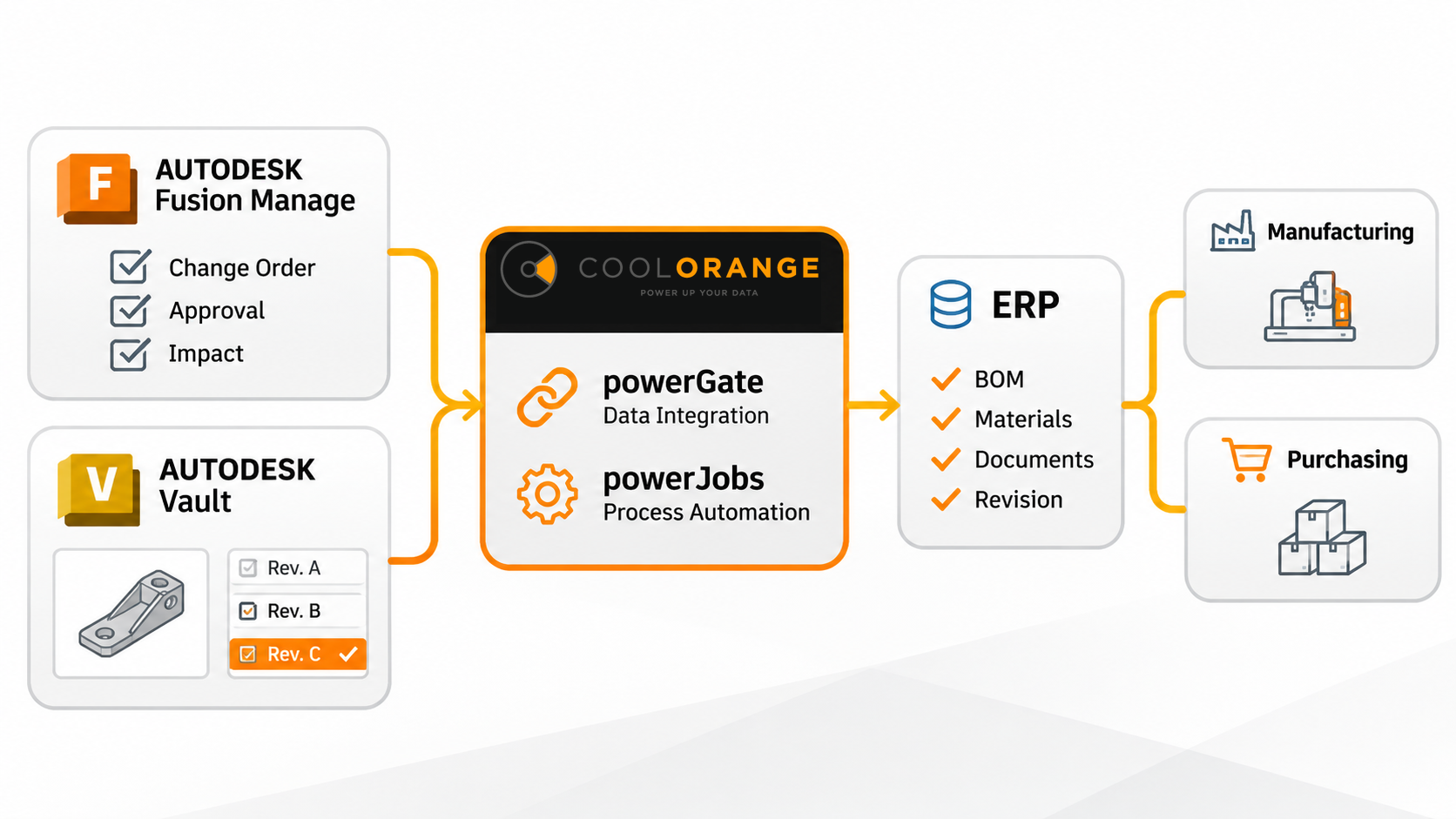
Autodesk's native Vault Connector can synchronize supported Vault Items, BOMs and configured attachments from Vault Professional to Fusion Manage. It requires Vault Items and operates in that direction, rather than providing a general ERP connection. File-based workflows or other handovers need a different approach.
This is where COOLORANGE's integration and automation expertise adds a practical option. Depending on the environment and configured rules, powerGate can support bi-directional data exchange between Autodesk Vault or Inventor and ERP, including item information and BOMs. powerJobs can automate the generation of manufacturing documents such as PDFs, DXFs and STEP files. Those configured tasks can reduce re-entry and document preparation. For example, a release could trigger a defined validation of required ERP material data before an approved BOM is transferred, while the related production files are generated for the next department. Triggers, mappings and checks must be configured for each environment; this is an illustrative approach, not an automatic Fusion Manage-to-ERP function.
Automation must follow the decision, not invent it. If an older revision remains valid for an open order, transferring the newest BOM indiscriminately could introduce errors. Teams must define data ownership, transfer conditions and visibility into failures.
Still checking approved changes manually before updating ERP? Discuss the Vault, Fusion Manage and ERP handover with COOLORANGE, starting with one change that required someone to reconcile the systems.
Adoption is visible after go-live
Completed change orders say little if planners still call engineering about revisions, purchasing retypes BOMs into ERP, or quality cannot establish which approval applies. A decision, responsibility or transfer may still be missing.
Training should follow each role's work. Engineers need to know what makes a change reviewable; planners need to find its manufacturing implications. Colleagues who helped test the workflow can explain those choices in familiar terms.
An internal owner needs time to adapt the process as products and teams change. Repeated clarification requests, incomplete records and delays after approval reveal more than login counts. Sometimes the fix is clearer ownership or integration, not another mandatory field. If the same handover question keeps coming back, testing that exact case with the planner and engineer gives the process owner something concrete to change, rather than another training session to schedule.
Common questions about PLM implementation
Why do PLM implementations struggle after go-live?
Approvals may be recorded while exceptions and downstream responsibilities remain unclear. Email handovers signal that the configured process doesn't cover the work.
Does Autodesk Fusion Manage automatically update ERP after approval?
No. Approval alone does not create an ERP integration. ERP updates require integration, mappings and rules for the applicable revision. Autodesk's native Vault Connector connects supported Vault data to Fusion Manage, not directly to ERP.
How can companies improve PLM adoption?
Test a real change with affected roles, using reliable data and role-specific training. Clear ownership and visible handovers help establish trust.
The process works when the next person can act
When a component is approved, planners should know what applies to the active order, purchasing should understand existing commitments, and engineering should not have to explain the decision again. That is a process shaped with the people who depend on it.
PLM cannot remove judgment calls or repair unreliable data automatically. Clear responsibilities and appropriate integrations can keep approval from starting another round of questions.
