ERP Integration & BOM Management

When a released BOM triggers heavy lifting
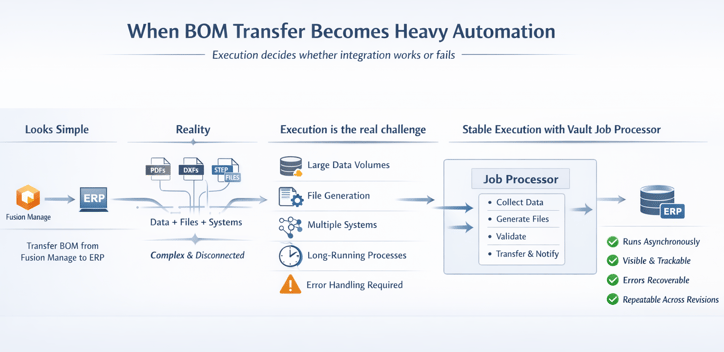
In a recent customer project, the requirement looked simple: transfer a BOM from Fusion Manage to an ERP system.
But very quickly, it became clear this was not just about moving structured data from one system to another.
Procurement and production did not only need the BOM. They needed PDFs, DXFs, and STEP files. Some already existed in Vault. Others had to be generated on demand, sometimes enriched with project-specific information.
The data itself was fragmented. Part of it lived in Fusion Manage. Another part lived in Vault. The ERP system exposed an on-premise API that could not be accessed directly from the cloud.
What initially looked like a transfer turned into a coordination challenge across systems, formats, and environments.
Your BOM logic might be solid. But is your execution?
See how reliable job-based automation changes the outcome.
Why execution matters more than logic
Defining what needed to be transferred was not the challenge. That logic was already clearly defined in Fusion Manage.
The real challenge was execution.
Large volumes of data had to be collected from Fusion Manage and enriched with technical details from Vault. Binary files such as PDFs, DXFs, and STEP files had to be retrieved or generated. Everything then had to be transferred reliably into the ERP system.
This process takes time. It must run consistently across BOM revisions and project updates. And when something fails, it must be visible and recoverable without restarting everything.
This is where many integrations break down. Not because of missing logic, but because execution is fragile.
The turning point: using the Vault Job Processor
Instead of introducing another system, the solution relied on something already available in the customer environment: the Vault Job Processor.
From a user perspective, nothing became more complex.
The engineering BOM is transferred into Fusion Manage, completed, and approved. That approval triggers a job in the Vault job queue. It does not matter whether the job originates from a user or from Fusion Manage. Once it enters the queue, the Job Processor takes over.
Behind the scenes, it handles the heavy lifting:
-
Collecting and validating all required data
-
Retrieving or generating CAD deliverables
-
Transferring structured data and files to ERP
-
Notifying downstream systems once completed
All of this runs asynchronously, without blocking users or slowing down systems.
Bridging cloud decisions with on-premise execution
At first, using an on-premise component for a cloud-triggered process may seem counterintuitive.
In practice, it is exactly what makes the process reliable.
The Vault Job Processor operates close to the data. It can access local files, interact with on-premise ERP APIs, and still respond to triggers coming from Fusion Manage.
Execution becomes transparent. Jobs are visible. Progress can be tracked. Errors are logged. Failed jobs can be retried without starting from scratch.
With technologies like the Vault Gateway and Data API, triggering these jobs from Fusion Manage is straightforward. Lifecycle changes, record updates, or manual actions can all initiate controlled automation without fragile workarounds.
Extending the Job Processor for real-world integration
Out of the box, the Vault Job Processor focuses on Vault tasks. In this project, it needed to orchestrate across Fusion Manage, Vault, and ERP.
This was achieved using powerGate.
A custom job connected back to Fusion Manage, retrieved the required data, enriched it with Vault information, and handled the controlled transfer into ERP.
The real value is not in the mechanics. It is in the architecture.
Execution logic lives in one place. It runs close to the systems it interacts with. And it can be monitored, maintained, and improved over time.
A pragmatic approach to heavy automation
Most organizations using Fusion Manage also use Vault. That means the Vault Job Processor is already available.
This project highlights a simple but powerful idea.
Not every problem requires a new system. Sometimes the better approach is to use what is already there and place execution where it can run reliably.
If your workflows involve BOM transfers, file generation, or long-running integrations, it is worth separating decision logic from execution.
When execution runs close to the data, with visibility and control, complexity becomes manageable.