
CAD & Vault Best Practices
The moment a drawing is printed, something subtle changes. It leaves the controlled environment of Autodesk Vault and enters the real world: shop floors, suppliers, quality inspection tables. From that point on, the drawing can silently become outdated while still looking perfectly valid.
That gap is dangerous.
Parts produced from outdated drawings do not just create confusion. They cause scrap, rework, delivery delays, and expensive quality issues. And in most cases, these errors do not happen because someone ignored a rule. They happen because no one could answer one simple question with confidence:
Is this still the right drawing to use?
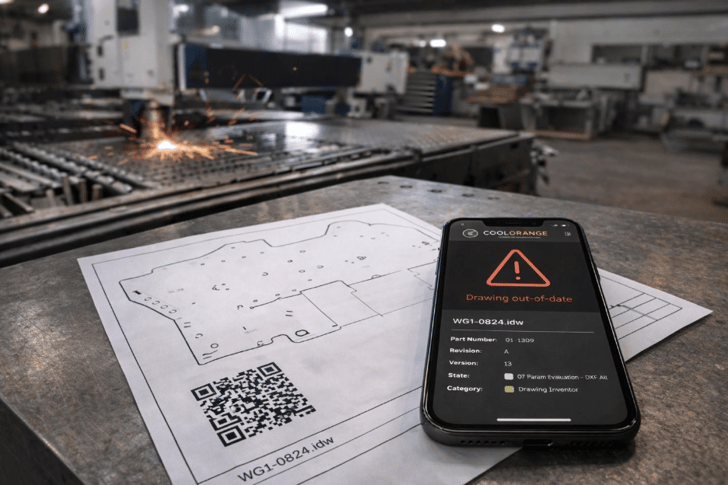
The Real Problem Behind QR Codes and Vault Drawings
Two earlier blog posts by Marco explored this challenge from different angles:
Both circle around the same moment of uncertainty.
When someone picks up a drawing in production, they are not thinking about lifecycle states or version histories in Autodesk Vault. They are trying to answer a practical question under time pressure:
Is this drawing current and safe to use?
QR codes appear attractive in this scenario because they create a bridge between paper drawings and digital systems. But a QR code alone does not solve anything. It only triggers whatever process follows.
The real value lies in what happens after the scan.
Why “Just Give Access to Vault” Is the Wrong Solution
Many companies assume that if shop floor employees or suppliers can access Autodesk Vault, the problem is solved.
In reality, this often creates new risks.
Most people working with drawings should never have to:
- Navigate Vault structures
- Compare file versions
- Interpret lifecycle states
- Understand release workflows
This applies especially to suppliers, but it is just as true internally.
This is not an access problem. It is a decision problem.
Using QR Codes to Verify Drawing Versions Automatically
Instead of linking the QR code directly to Vault, a more robust approach is possible.
The QR code on the drawing points to a web application. When scanned:
- The application securely connects to Autodesk Vault in the background
- It checks whether the referenced drawing version is still the latest released version
- It returns a clear, immediate result
The complexity remains hidden. The outcome becomes visible.
Anyone, internal or external, can verify a drawing, without having Vault access, without understanding Vault, and without risking accidental misuse. The complexity stays hidden, the outcome stays clear.
Clear outcome, lower risk
The result is intentionally simple
|
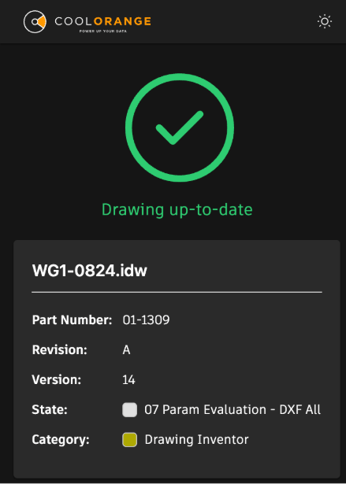
If the drawing is current, the user gets a clear confirmation and can continue working: |
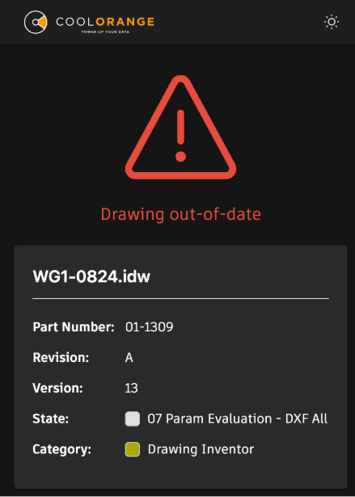
If it is no longer current, the warning is immediate. Production can stop before material, time, and money are lost: |
|
No searching, no comparison, no interpretation. Just a visible answer at the moment it matters. |
|
Why Outdated Drawings Are a High-Cost Risk
Outdated drawings are not a theoretical risk. They are a recurring source of high-cost errors in real production environments.
By shifting the responsibility for verification from people to a purpose-built check, the process becomes safer and more predictable - without forcing every participant to become a Vault expert.
QR codes are simply the entry point. The real value comes from designing what happens after the scan, so the right decision becomes unavoidable.
Rethinking Drawing Verification in Vault-Based Workflows
If outdated drawings are a recurring risk in your environment, the question is not:
- Should we enforce Vault usage more strictly?
- Should we train people more?
- Should we add more rules?
The real question is:
Do the people using drawings have a clear, immediate way to verify correctness without accessing systems they were never meant to operate?
That perspective often leads to simpler and safer solutions than adding more control layers.
And in manufacturing, simplicity is often the strongest form of risk reduction.
.png)
.jpg)