
Screenshot 2023-05-17 alle 11.33.22

If are you looking for a smooth and effortless integration between Vault and your ERP 

Join our upcoming webinar on May 31st 

Your ERP data is already in Autodesk Vault.

Now you can talk to it.

powerGate ERP Connector for AI links any AI Agent that supports MCP, to your ERP system through the powerGate Server you may already be running, so your team can ask real questions in plain language instead of waiting for a report.

autodesk-vault-ai-assistant-erp-chat

- THE GAP NO DIALOG FILLS

powerGate already shows your data inside Vault & Inventor.

That problem is solved.

Select a component and see its ERP status, compare BOMs, or transfer items, all in the context of the part you're working on. What's still missing are the questions no dialog was ever built to answer, because they aren't about a single item. They're about connections across your data: BOMs and deliveries, prices and structures, stock and product families. 

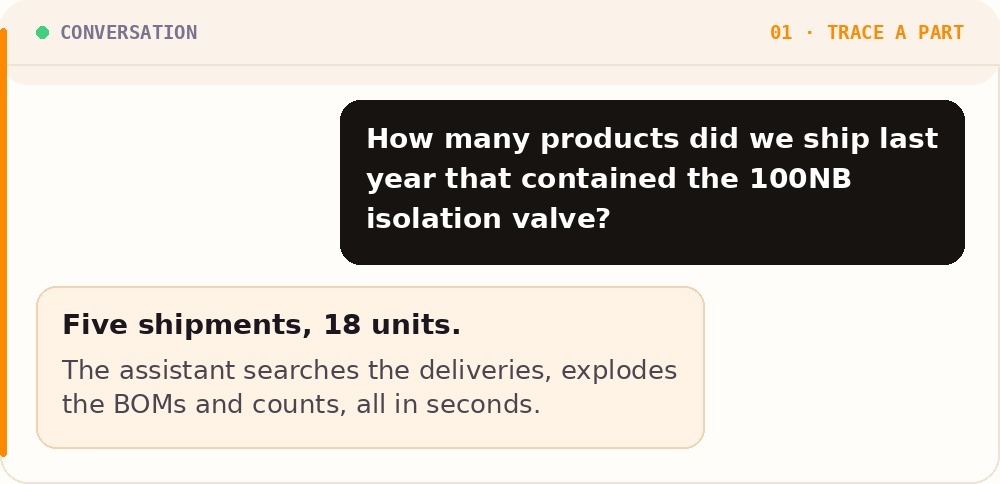
Our supplier just discontinued this valve. Which of the machines we delivered in the last two years contain it?

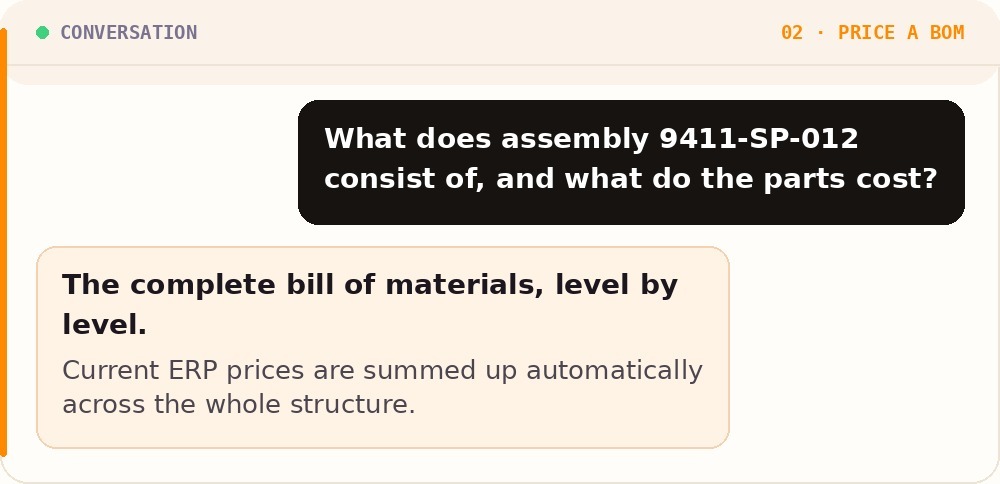
What would this assembly cost to build, based on current ERP prices, across all levels of the BOM?

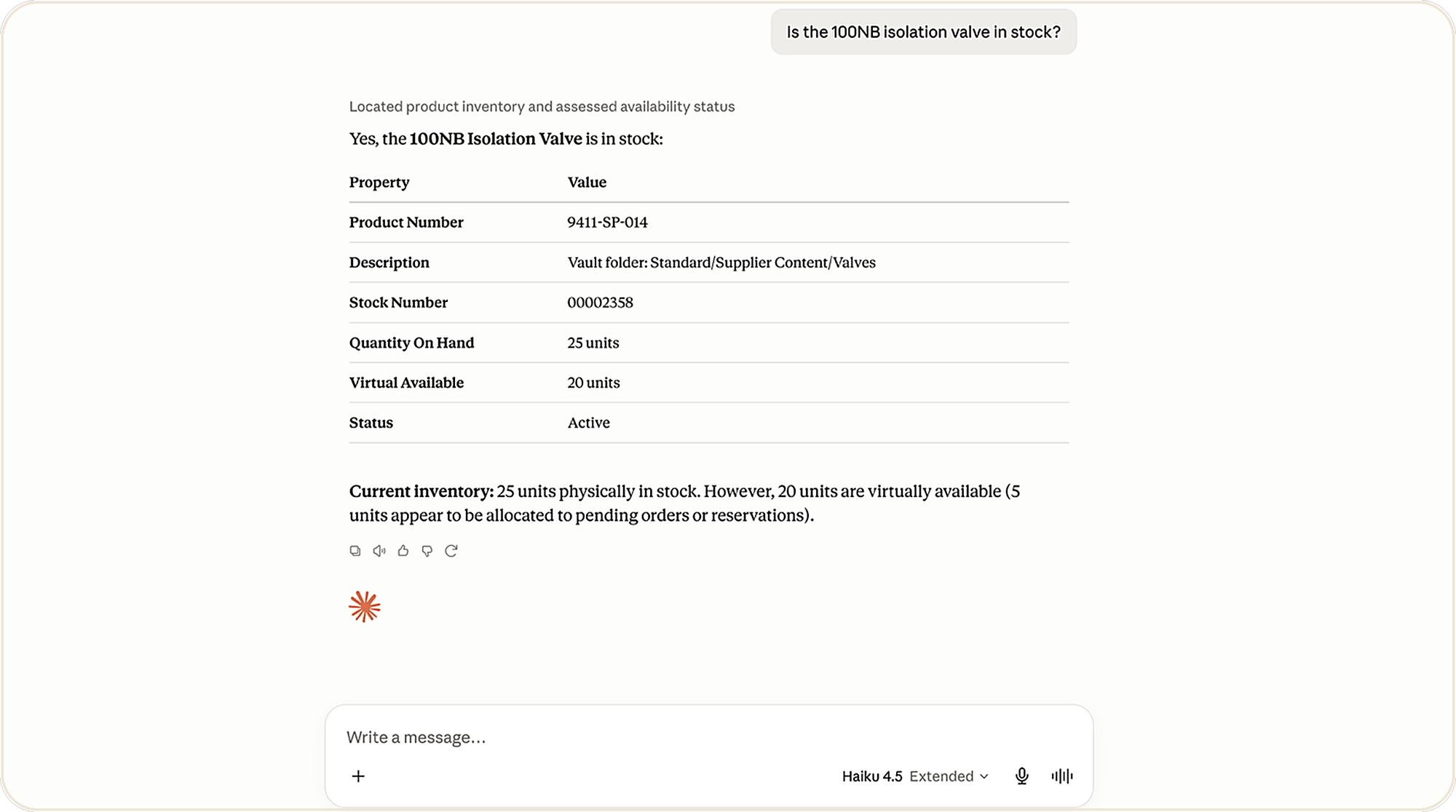
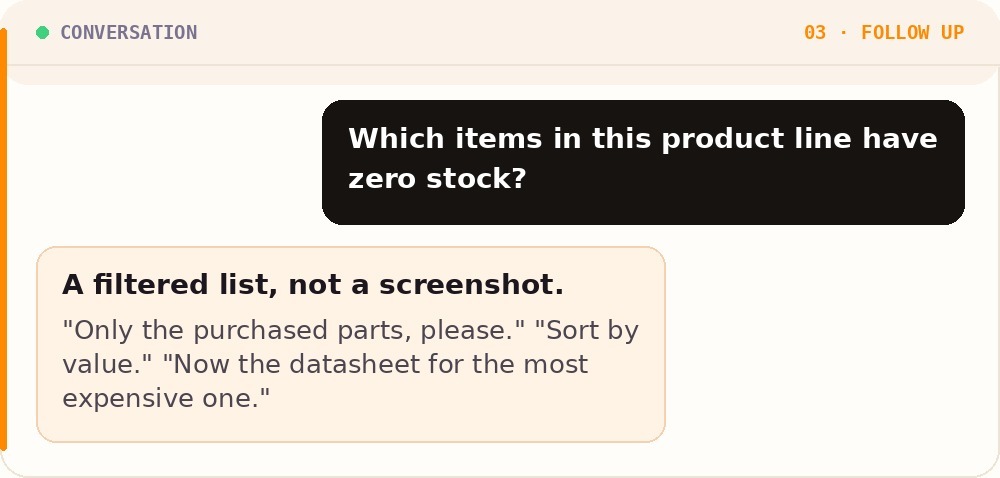
Which purchased parts in this product family are below minimum stock right now?

Every CAD manager recognizes this kind of question. Today, answering it means asking the ERP team and waiting, or requesting a custom report that takes days to build and is already outdated by the time the next question comes along. 

// TODAY
A dialog can only answer the question it was designed for.

Real questions don't work that way. They mean a call to the ERP team, or a custom report that's outdated the moment the next question comes along.


// WITH POWERGATE ERP CONNECTOR FOR AI
Ask, don't click.

Ask in plain language and get an answer in seconds, drawn straight from the live ERP data behind Vault.

Seconds

Any AI agent

MCP

On-prem

To answer questions that used to take days

Works with any AI agent that supports MCP (STDIO) 

Built on the open Model Context Protocol

Runs on your infrastructure, no cloud data sharing

- WHAT YOU GET

Ask, don't click.

powerGate ERP Connector for AI connects AI assistants to your ERP system through the powerGate Server. Instead of waiting for a report, you ask, and the assistant searches, calculates and answers in seconds. 

example-01-trace-part

TRACE A PART ACROSS DELIVERIES

From discontinued part to affected machines, in one question

When a supplier discontinues a component, you no longer need to cross-reference deliveries and BOMs by hand. Ask which shipments contain it, and the assistant walks the structures for you.

Searches deliveries and explodes BOMs automatically 
Counts affected units and machines, not just parts
An answer in seconds, where a custom report once took days

PRICE A BOM ON THE SPOT

How much would this cost to build, based on today prices?

Costing an assembly across every level of its structure used to mean pulling prices item by item. Now the assistant reads the BOM, looks up current prices and adds them up while you keep working. 

Full BOM, level by level, with live ERP pricing
Costs summed automatically across the structure
Never out of date, because it reads the ERP live

example-02-price-bom
example-03-follow-up

FOLLOW UP LIKE A CONVERSATION

Every follow up question used to mean a new report

Because it's a conversation, you can keep going. Narrow the list, re-sort it, or pull a related document, all without leaving the chat or filing another request with the ERP team.

Filter, sort and refine with plain-language follow-ups
Results you can act on, not a static export
No dialog to redesign when the question changes 

THE BIGGER PITCURE

AI is coming to Vault & Inventor

powerGate ERP Connector for AI is built on MCP, the Model Context Protocol, the open standard AI assistants use to connect to business systems. Autodesk has announced that its Assistant will support third-party MCP connectors, and is moving into the products you use every day.

icon-mcp

Built on MCP

The open standard AI assistants use to connect to business systems. 

icon-gateway

Runs through powerGate

Uses the powerGate Server and ERP plugin you may already have installed. 

icon-live

Available today

Start asking questions with any MCP (STDIO) AI agent right now.

icon-vault

Ready for Vault & Inventor

Positioned for the moment Autodesk's Assistant supports MCP connectors natively.

shutterstock_2802553517

 That means your ERP will soon be one question away without ever leaving your CAD environment. Imagine finishing an assembly in Inventor and asking what it would cost to build, or asking Vault which delivered machines are affected by a discontinued part, right where you work. powerGate ERP Connector for AI is our way of being ready on day one, and you can start using it with any AI agent that supports MCP.

SAFE BY DESIGN

Letting an AI work with your ERP raises fair questions. Control is the core design principle.

powerGate ERP Connector for AI runs entirely on your own infrastructure and sends no data to any coolOrange or third-party cloud service. What the assistant can do is limited to a small, fixed set of operations, and your administrator can review every one of them.

Runs on your infrastructure: No ERP data ever passes through a coolOrange or third-party cloud service. 
A fixed, reviewable set of operations: The assistant can only do what your administrator has explicitly allowed. 
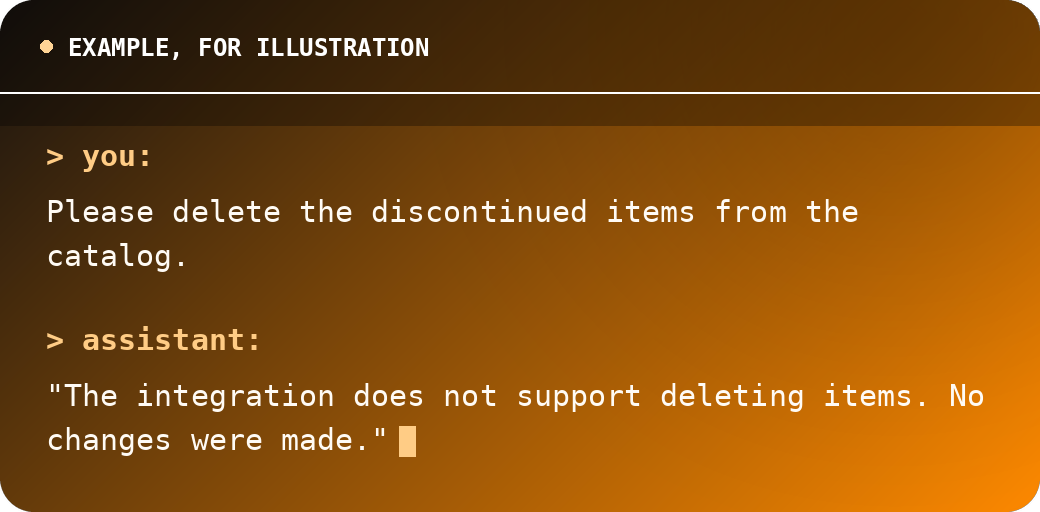
Your integration always has the final say: If something isn't allowed, the assistant says so honestly instead of guessing. 

terminal-refusal-1

WORKS WITH YOUR ERP

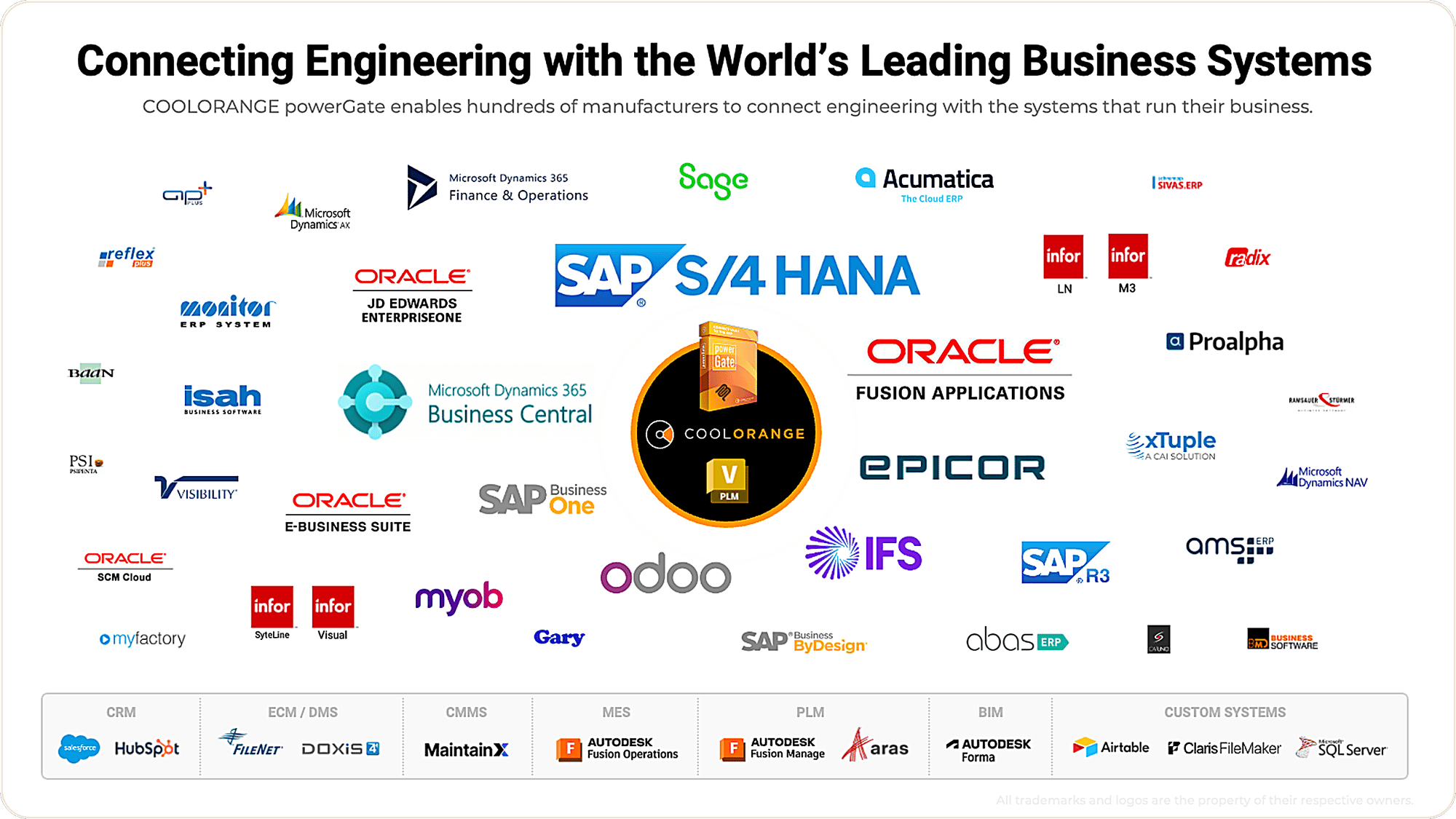
A powerGate plugin exists
for any ERP system

If powerGate already connects Vault to it, powerGate ERP Connector for AI can talk to it too. 

erp-systems-collage

- GETTING STARTED

From download to your first answer,
in four steps

step-1

Get it from the Marketplace

Download powerGate ERP Connector for AI from the Autodesk Marketplace, free to try, or reach out to us directly

step-2

Connect your powerGate Server

Point it at the powerGate Server and ERP plugin your Vault environment already uses.

step-3

Add it to your AI assistant that supports MCP

Connect the assistant your team already uses, and review the operations it's allowed to run. 

step-4

Ask your first question

Start with something real: a BOM cost, a stock check, a part across your deliveries. 

 A coolOrange Labs prototype


Seeing your ERP data inside Vault and Inventor was the first step, and powerGate solved that years ago. Asking questions of that data is the next one. powerGate ERP Connector for AI turns your ERP from something you look up into something your team can simply talk to: today in any MCP (STDIO) AI agent, and soon right inside Vault and Inventor.

It's stable enough to run against real environments, which is exactly the feedback we're looking for, but it comes without the support commitments of a mature product. If asking your ERP a question would change your daily work, we want to hear about your environment: how many machines, which job types, where it hurts.

- READY TO ASK YOUR ERP A QUESTION?

powerGate ERP Connector for AI is on the Autodesk Marketplace now.

Free to download and try. You can also reach out and tell us where it would help most.