
vapiTrace in Fidder Classic: Learn the Vault API and generate better PowerShell faster
Autodesk Vault 2027 is here, and with it comes a fresh opportunity to look more closely at how Vault works under the hood.
The latest version of vapiTrace has been tested against Autodesk Vault 2027 and now includes several improvements that make it easier to understand Vault API traffic, inspect real client behavior, and turn captured calls into useful PowerShell code.
If you create Vault customizations using PowerShell and the Vault API, this release is focused on one practical goal: make it easier to learn from real Vault client activity and reuse what you discover.
What is vapiTrace?
vapiTrace is a Fiddler Classic inspector for Autodesk Vault SOAP traffic.
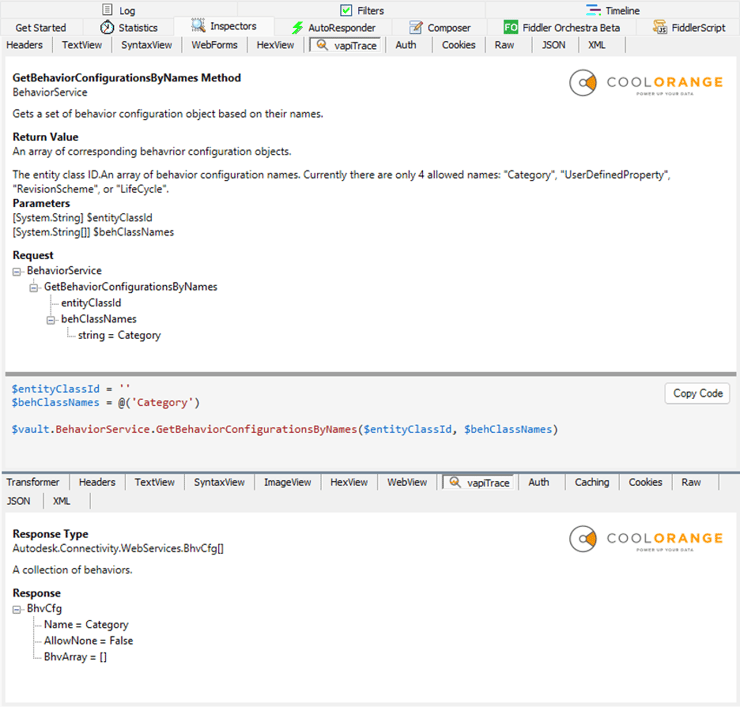
Instead of looking at raw XML envelopes, you can select a captured Vault request in Fiddler and inspect it in a more readable form:
- the Vault service being called
- the API method name
- the request parameters
- the response type
- the response payload
- related Vault API documentation when available locally
The idea is simple: perform an action in the Vault client, capture the request, and let vapiTrace show which Vault API call was made and what data was passed.
Learn more about vapiTrace in our previous blog: https://www.coolorange.com/en/blog/enhancing-autodesk-vault-api-traffic-tracing-with-vapitrace
What is new in the latest version?
Better PowerShell Code Generation
The biggest improvement in this release is the enhanced PowerShell code generation.
Previously, vapiTrace generated a code snippet for a method call like this:
$vault.PropertyService.GetProperties($entityClassId, $entityIds,
$propertyDefIds)
That was useful as a hint, but users still had to inspect the request tree and manually recreate the parameter values.
The new version now initializes variables from the traced request before calling the Vault API method:
$entityClassId = ‘FLDR’
$entityIds = @([long]2)
$propertyDefIds = @(
    [long]39,
    [long]54,
    [long]119
)

$vault.PropertyService.GetProperties($entityClassId,
$entityIds, $propertyDefIds)
Arrays, Primitive Values, and Object Parameters
Vault API calls often include arrays and structured objects, not just simple strings and numbers.
The updated code snippet generator now reads the traced SOAP request and converts parameter values into PowerShell-friendly representations:
- strings become quoted PowerShell strings
- numeric values are emitted with useful type information
- Boolean and null values are represented as $true, $false, and $null
- arrays are emitted as @(...)
- complex objects are represented as hashtables
For object-style parameters, generated output can look like this:
$someObject = @{ 'Name' = 'Example' 'Id' = [long]123 }
The generated code snippet is still intended as a starting point, especially for complex Vault API objects, but it removes much of the repetitive work of copying values from the request tree into a script.
Improved Code Reuse Experience
The PowerShell output area has also been improved:
- generated code is syntax-highlighted
- strings, numbers, type literals, variables, and method names are easier to scan
- the code panel is taller by default
- a splitter lets users resize the request tree and generated code area
- a Copy Code button copies the generated script to the clipboard
These are small details, but they matter when working with real Vault calls that contain many arguments.
Summary
The new version of vapiTrace makes it easier to inspect Autodesk Vault API traffic and turn captured calls into useful PowerShell examples.
The key improvements are:
- tested with Autodesk Vault 2025, 2026, and 2027
- better PowerShell generation with traced parameter values
- support for arrays and object-style parameters
- improved syntax highlighting
- resizable code panel
- one-click copy for generated code
Whether you simply want to explore the capabilities of the new Vault API or have to work on extensive customization projects, this update should make it faster to learn from the Vault client and build PowerShell scripts based on real Vault API calls.


.png)