Cloud Collaboration & Data Access
In many organizations, Autodesk Vault does its job well. It controls CAD data, enforces lifecycles, and gives engineering teams confidence that the right version is being worked on.
The friction starts when a workflow needs to leave engineering. Project managers want to review geometry without installing Vault. Customers ask for neutral formats tied to a specific release. Quality, service, or sales teams want to comment on products that engineering has already finished. What usually follows are manual exports, shared folders, emailed files, or one-off scripts that quietly bypass Vault rules.
Vault remains the system of record, but it becomes isolated. Every workaround increases the gap between controlled engineering data and how the rest of the organization actually collaborates.
Why this problem keeps coming back
CAD design teams rely on Vault to securely store and manage engineering data. Where things get difficult is exposure.
Vault is built for designers to control data precisely. While it can connect to Autodesk cloud products and synchronize files, collaboration is often handled by pushing data outward.
That’s where problems start. Once files are copied to shared folders or uploaded to cloud platforms, Vault’s decisions stop traveling with them. Lifecycle state, approvals, and traceability are lost or recreated elsewhere. This may work short-term, but it rarely holds up through process changes, audits, or upgrades.
Extending Vault workflows instead of duplicating them
A more durable solution is to let Vault-driven workflows actively interact with Autodesk’s cloud platforms instead of working around them.
With Autodesk Platform Services (APS) underpinning products like Autodesk Construction Cloud (ACC) and Fusion Team, there is a stable, supported integration layer designed exactly for this purpose.
The question becomes how Vault can participate in that ecosystem without giving up control.
This is where coolOrange’s approach differs from traditional integrations. Our products natively allow Vault and the Vault Job Processor to interact with APS-enabled Autodesk platforms. They enable Vault jobs to authenticate against APS services and interact with ACC or Fusion Team as part of standard Vault automation. 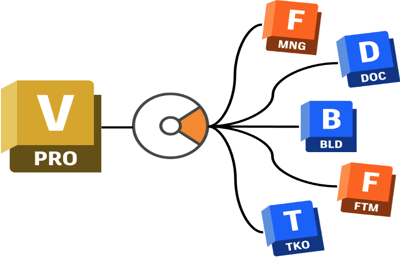
This follows the same idea coolOrange has applied for years with the Vault - Fusion Manage integration. Vault remains the system of record, while its workflows are made visible and usable in Autodesk cloud platforms where collaboration happens.
That same principle now applies to ACC and Fusion Team. The target platforms differ, but the intent is consistent: Vault decisions are not duplicated or reimplemented elsewhere, they are surfaced where they are needed.
Taken together, these products allow Vault workflows to reach across Autodesk’s cloud ecosystem in a controlled and maintainable way, without weakening engineering ownership or fragmenting processes.
APS-enabled platforms receive data and context at the right moment. Responsibility boundaries stay clear. Vault remains authoritative. Cloud platforms become controlled consumers of Vault decisions.
And because this capability is built into coolOrange products, it stays upgrade-safe and aligned with Autodesk’s platform direction.
What this enables in real workflows
Once Vault can natively interact with APS-enabled products, several scenarios become practical without redesigning processes:
- Automatic release publishing
When a design is released in Vault, neutral formats and selected metadata can be published automatically to ACC for customer or project review.
- Collaboration for non-engineering users
Fusion Team can serve as a collaboration space for project managers, sales, or service teams who need access to design information but do not require Vault.
- Traceable feedback from outside engineering
Comments, markups, or issues raised in cloud platforms can be linked back to the corresponding Vault items, keeping feedback connected to the authoritative data.
- Extended design reviews
CAD design reviews can be extended to ACC, allowing internal or external stakeholders to participate in review and approval processes without direct Vault access.
- Controlled data handover to downstream teams
Manufacturing, quality, or service teams can receive the right files at the right time, driven by Vault lifecycle events instead of manual exports.
The key point is that engineering does not lose control. The workflows remain Vault-driven. What changes is who can participate and how early.
Questions worth asking internally
If Vault is already central to your engineering data, a few questions usually clarify whether this approach makes sense.
-
Who needs access to results, not CAD tools?
-
Where are we manually exporting or uploading data today?
-
Which Vault decisions should drive external visibility?
If those questions point outside engineering, extending Vault workflows into Autodesk cloud platforms is often the more sustainable path forward.