
CAD & Vault Best Practices

Ever had the need to select a set of items or files in Vault and quickly export that selection into a report or an Excel spreadsheet you can actually work with?
Not as part of a predefined process or scheduled report, but to answer a concrete question right now. To review the data, discuss it with others, add notes, compare it with an earlier state, or pass it on so someone else can continue working with it.
There are several ways to accomplish this in Vault. In this post, we look at one concrete approach: bringing selected Vault data into Excel for on-demand, situational reporting.
Two reporting intents, one Vault
Before looking at the solution itself, it helps to separate two different reporting intents that commonly exist side by side in Vault environments.
Static corporate reports are designed to establish a shared and repeatable view of data:
-
They are intentionally structured the same way every time
-
They are often generated automatically, triggered by lifecycle changes, schedules, or explicit actions
-
They serve as reference, evidence, or official output
Because stability and consistency are the goal, these reports are typically built on a stable reporting engine such as Vault’s SQL-based reporting using RDLC templates. Adapting or extending them usually requires technical skills and dedicated tooling. This is acceptable and often desirable for reports that are meant to remain unchanged over long periods of time.
Dynamic on-demand reports serve a different purpose:
-
They are created when a specific question arises
-
They are generated manually by the person who needs the answer
-
They support comparison, discussion, and short-term decision making
Here, flexibility matters more than strict guardrails. Using an Excel file as a template is often good enough and significantly faster when the structure needs to be adapted to the situation or purpose. Adjusting columns, layout, or included data does not require report-authoring expertise and can be done directly by the people using the report.
The case described below clearly falls into this second category.
The situation
You need a clean snapshot of current Vault data to support a conversation, coordinate next steps with others, or simply share a list so that someone else can continue processing it.
That might mean selecting a set of items, a list of files, or an assembly with its children and creating an export you can actually work with. A document where notes can be added, questions clarified, or decisions prepared, and that can be passed on to a colleague without further explanation.
The export does not need to be highly formal, but it does need to be structured enough to be usable. It should be based on a template, and ideally there should be different templates for different situations. Just as important, new templates should be easy to create when new needs arise without having to involve an administrator every time.
The exact downstream use can vary. It might support engineering discussions, clarification with purchasing or production, or alignment with other systems. The pattern is always the same. The report is used as a working artifact rather than as a formal record.
Need a faster way to export Vault data to Excel?
In a design review, someone asks for a list of parts with revisions. Vault has the data, but the discussion needs a simple Excel document.
The solution
Because the report is created on the fly and used directly by the Vault user, the solution was to extend the Vault client with a custom menu action.
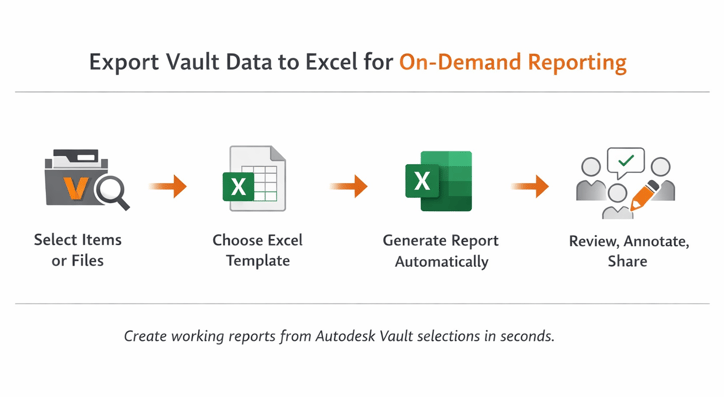
The workflow is intentionally simple:
-
The user selects the relevant data in Vault
-
A custom menu item is triggered
-
The user is asked which Excel template to use
-
The selected data is written into the template and opened immediately in Excel
From the user’s point of view, there is no reporting workflow to learn. It feels like a natural extension of working in Vault.
Template-driven, centrally managed
All Excel templates are stored centrally in Vault in a dedicated folder. When the user triggers the export, the logic reads the available templates from that folder and presents them for selection.
This has several practical effects:
-
All Vault users see the same set of available templates
-
Templates are versioned and managed like any other Vault data
-
Any user with the appropriate permissions can create or adapt templates
The templates themselves contain simple instructions that define:
-
Where data population starts in the worksheet
-
Which Vault properties map to which columns
-
Which related data, such as linked files, should be included
When a template changes, the export logic does not need to change. The template drives the structure.
Built to adapt
The entire solution was implemented using powerJobs.
This makes it easy to change and extend the export logic as requirements evolve. It can support different selections, additional data sources, or new template conventions.
Just as importantly, the solution remains compatible across Vault versions. What starts as a situational reporting solution does not turn into a fragile customization that complicates future upgrades.
Closing thoughts
While connecting Vault with other systems such as ERP or PLM is essential for continuous data exchange, the need to quickly export a selection of data will not go away.
The real question is whether that need is repeatable and corporate in nature, where static reports and RDLC-based reporting are the right choice, or situational, where an Excel-based export is good enough and more flexible.
Vault can support both approaches with small and well-chosen customizations. When done carefully, those extensions remain maintainable and compatible across Vault versions.

.png)